> For the complete documentation index, see [llms.txt](https://docs.smithii.io/llms.txt). Markdown versions of documentation pages are available by appending `.md` to page URLs; this page is available as [Markdown](https://docs.smithii.io/products/tools/solana/token-tools/airdrop-tokens.md).
# Airdrop Tokens
Launch your own Airdrops on Solana
Solana Airdrop Tool
🔗 Solana Token Multisender**:** [**https://tools.smithii.io/token-multisender/solana**](https://tools.smithii.io/token-multisender/solana)
1. Go **to our** [Solana Multisender](https://tools.smithii.io/token-creator/solana) **tool** ()
2. **Connect** your **wallet** **to** be able to use it.
3. Select the **token** for your **airdrop**.
4. Indicates the **number of tokens** to be received by each wallet.
5. **Enter the wallets** that will receive the airdrop.
6. Verify that all information is **correct**.
7. **Click** on "Start Airdrop" and **accept** the **transaction**.
If you prefer the tutorial in video format this is for you:
{% embed url="" %}
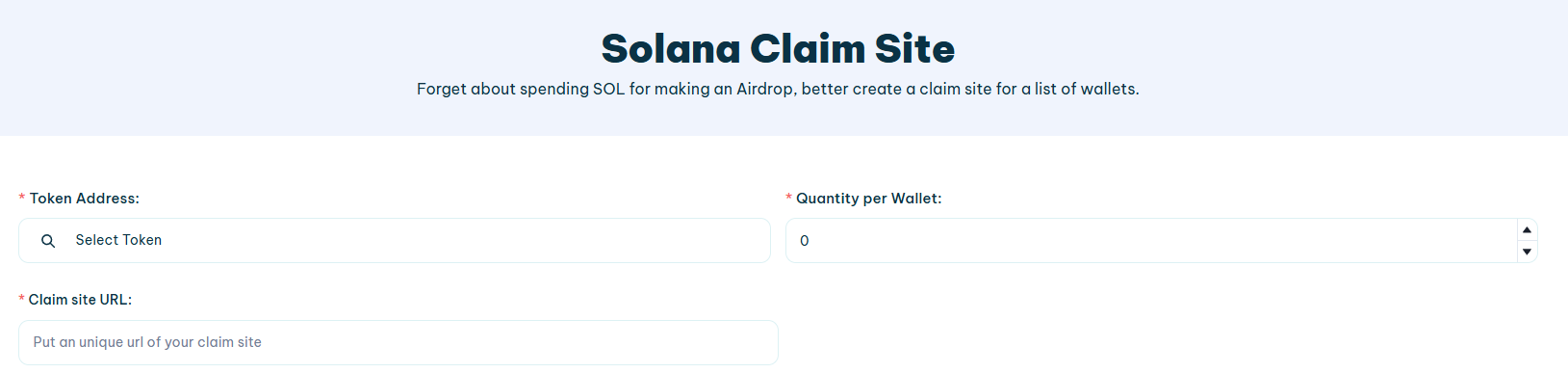
Solana Claim Site
🔗 Solana Claim Site**:** [**https://tools.smithii.io/claim-site/solana**](https://tools.smithii.io/claim-site/solana)
1. **Token Address**: This section allows you to load the tokens to be claimed
2. **Claim Site URL**: This field allows you to enter a **unique URL** that will be the address of claim site. Users will access this URL to claim their tokens.
3. **Quantity per Wallet**: Here you define the number of tokens that each wallet will be able to claim.
4. **List of Wallet Addresses**: This is the field where the addresses of wallet that will be entitled to claim the tokens are entered. It can be added manually one by one, as shown in the list, or it can be done through a CSV file uploaded to the platform.
5. **Total Amount Claimable**: Here you will see the amount to be claimed taking into account the number of wallets and the number of tokens per wallet.
6. **Set Finish Date**: Allows you to set a closing date for claim site, indicating until what day and time users will be able to claim tokens. If no end date is set, the default duration is 30 days.